TTSMaker: Is This Text to Speech Online Tool Right for You?
TTSMaker is often the first stop for anyone who needs a quick text to voice clip without opening a wallet. This guide explains what the tool does, what its free plan really covers, how it compares with Natural Reader and other text reader apps and read aloud tools, and when a complete AI voice generator is the smarter choice.
Text to speech online · Mac & PC · 30-day money-back guarantee
Quick Takeaways Before You Dive In
- TTSMaker is a free, browser-based TTS converter with a big voice library and a weekly character allowance.
- It shines for short clips, drafts, and one-off voiceovers, and quick read aloud proofing, but long scripts and brand-level polish expose its limits.
- Natural Reader suits people who want a dependable text reader for documents, while GPTVoicer suits people who write and narrate in one place.
- Always confirm current limits and licensing on the official page before publishing commercial work.
What Is TTSMaker? A Plain-English Overview
TTSMaker is a web-based text to speech online service. You paste or type some writing, choose a language and a voice, press one button, and within seconds you can listen to the result or download it as an audio file. Nothing needs to be installed, which is exactly why students, video editors, and small business owners keep it bookmarked as a fast text reader for everyday jobs.
Under the hood, ai text to speech services like this one rely on neural speech synthesis, the same family of technology used by modern voice assistants. Instead of gluing together recorded syllables, a neural model predicts how a whole sentence should sound, including rhythm, stress, and pitch. That is why even a free tool such as TTSMaker can sound far more human than the stiff, robotic voices people remember from years ago.
How TTSMaker Fits Into the Wider TTS Landscape
The TTS market now splits into three broad groups. Free browser tools like TTSMaker focus on speed and zero cost. Reader-style apps such as Natural Reader focus on listening to documents, web pages, and e-books. Full production suites, including the GPTVoicer app featured on this site, bundle an AI voice generator with a script writer and licensing for client work. Knowing which group you belong to saves hours of trial and error.
Who Uses TTSMaker Most Often
Typical users include teachers who want a read aloud version of their lesson notes, YouTubers who need a placeholder narration, language learners checking pronunciation, and developers who want a prototype voice for an app demo. If your needs are small and occasional, a free text to audio tool is frequently all you require.
TTSMaker Features: What You Actually Get
Feature lists on directories can mislead because the numbers change as a service grows. The points below describe the general shape of TTSMaker, so confirm exact figures on the official TTSMaker website before planning a large project.
Big Voice and Language Catalog
TTSMaker advertises hundreds of voices across dozens of languages and accents, which is generous for a free ai text to speech service. English, Spanish, French, German, Japanese, Korean, Arabic, and many more are covered, so a single text to voice workflow can serve a global audience.
Weekly Free Character Allowance
Rather than a tight daily cap, the free plan has offered a weekly bundle of characters, with certain voices marked as unlimited. Each conversion also carries a per-run limit that depends on the voice, so long scripts must be split into chunks before you generate audio.
Commercial Use on the Free Plan
According to its published terms, audio made on the free plan may be used for lawful commercial purposes. That openness is a big reason creators recommend ttsmaker to friends, yet you should still reread the licence before you monetise a channel.
Audio Controls and Export Formats
You can adjust speaking speed and volume, insert pauses, and export your text to audio files in formats such as MP3 and WAV. Those files drop straight into editors like Premiere Pro, DaVinci Resolve, or CapCut, so the TTS converter slots into an existing video workflow without fuss.
In short, the feature set reads like a toolbox for quick text to voice wins. It is a handy workbench, not a full studio, and it never pretends to be.
How to Use TTSMaker Step by Step
The workflow is pleasantly short, and most first-time users finish a text to voice clip in under five minutes. Here is the sequence that works best, along with the small habits that make the output sound polished.
Step 1: Prepare and Paste Your Text
Clean your script before it touches the converter, and read it aloud once to catch clumsy phrases. Remove stray line breaks, expand abbreviations, and spell out numbers or acronyms that a voice might misread. Ten minutes of tidying saves you from burning characters on re-runs, which matters on any free plan.
Step 2: Pick a Language and Voice
Choose the language first, then audition several voices. A warm, mid-paced voice suits tutorials, while a crisp, upbeat voice suits adverts. Listen to the same paragraph with two or three options, because a voice that sounds great in a demo can feel wrong for your topic.
Step 3: Adjust Speed, Volume, and Pauses
Slow the pace slightly for technical subjects and add short pauses between key ideas. Tiny timing tweaks are what separate a flat text to audio file from narration that feels written for the ear.
Step 4: Generate, Listen, and Download
Complete any captcha, generate the audio, and play the whole clip back before downloading. Re-running a section uses more of your allowance, so decide on your edits first. Once the file sounds right, save the text to audio file in the format your editor prefers.
Common Beginner Mistakes
- Pasting a whole article instead of splitting it into sections
- Skipping the preview and discovering mispronounced names after export
- Ignoring the licence terms for commercial projects
- Using one voice for every tone, from jokes to serious warnings
Avoid these four slips and your results will already beat most first attempts with any ai text to speech tool.
TTSMaker Pros and Cons at a Glance
Every tool is a set of trade-offs. This quick scorecard shows where TTSMaker earns its popularity and where creators start to feel friction.
What TTSMaker Does Well
- Free to start, with no subscription needed for light use
- A wide choice of voices and languages for a free TTS tool
- Quick text to voice generation and text to audio downloads straight from the browser
- Commercial use allowed under its published terms
- A simple layout that beginners understand immediately
Where TTSMaker Falls Short
- Weekly character limits slow down large projects
- Per-conversion limits force you to split long scripts
- Captcha checks and ads interrupt the flow
- No built-in script writer or ready-made templates
- Limited fine control over emphasis and emotion on many voices
Notice the pattern: the strengths are about access, and the weaknesses are about scale. That is normal for free software, and it explains why creators with growing channels often start searching for a ttsmaker alternative after a few months of regular use, ideally one with ai text to speech quality and a writing assistant.
Best Use Cases for TTSMaker and Similar Text to Speech Tools
YouTube and Short-Form Video
Narration is the quickest way to turn a script into a watchable video. A free tool handles placeholder voice tracks nicely, and a tidy text to audio export keeps your editing timeline moving.
Online Courses and Corporate Training
Course creators rely on ai text to speech and text to speech online services to narrate slides in several languages without booking a studio. Consistent audio quality also helps learners concentrate on the lesson instead of the voice.
Accessibility and Study Support
A text reader that can read aloud web articles, PDFs, and study notes helps people with dyslexia, low vision, or simple screen fatigue. Listening during a commute turns idle minutes into learning time.
Podcasts, Audiobooks, and Blog Audio
Plenty of bloggers add an audio version of every article so visitors can listen instead of scroll. Turning written chapters into text to audio episodes also makes self-published books easier to share.
Apps, Games, and Prototypes
Developers drop synthetic voices into demos to test user flows before hiring actors. A dependable text to voice engine keeps those prototypes believable.

TTSMaker Limitations to Know Before You Commit
An honest ttsmaker review cannot skip the trade-offs. None of them are deal breakers for casual users, but each one matters once voice work becomes part of your income.
Character Caps and Long Scripts
A weekly allowance sounds generous until you voice a ten-minute video script. Splitting text into chunks, tracking characters, and stitching text to audio clips together in an editor takes time, and every retake draws from the same pool.
Pronunciation and Emotion Control
Brand names, technical terms, and mixed-language sentences are tricky for any ai text to speech engine. Free voices rarely offer phoneme-level editing, so you may end up respelling words phonetically just to hear them pronounced correctly.
Workflow Gaps Around Writing
TTSMaker converts what you give it. It does not draft, rewrite, or localise your script the way a text to speech AI suite can, so you juggle a second tool, usually a chatbot, before the audio step. Every extra tab adds friction, especially on deadline.
Policy and Plan Changes
Free tiers evolve. Limits, features, and licensing language can change without much notice, so treat any blog post, including this one, as a starting point and verify the details on the official page.
Ready to Go Beyond a Basic TTS Converter?
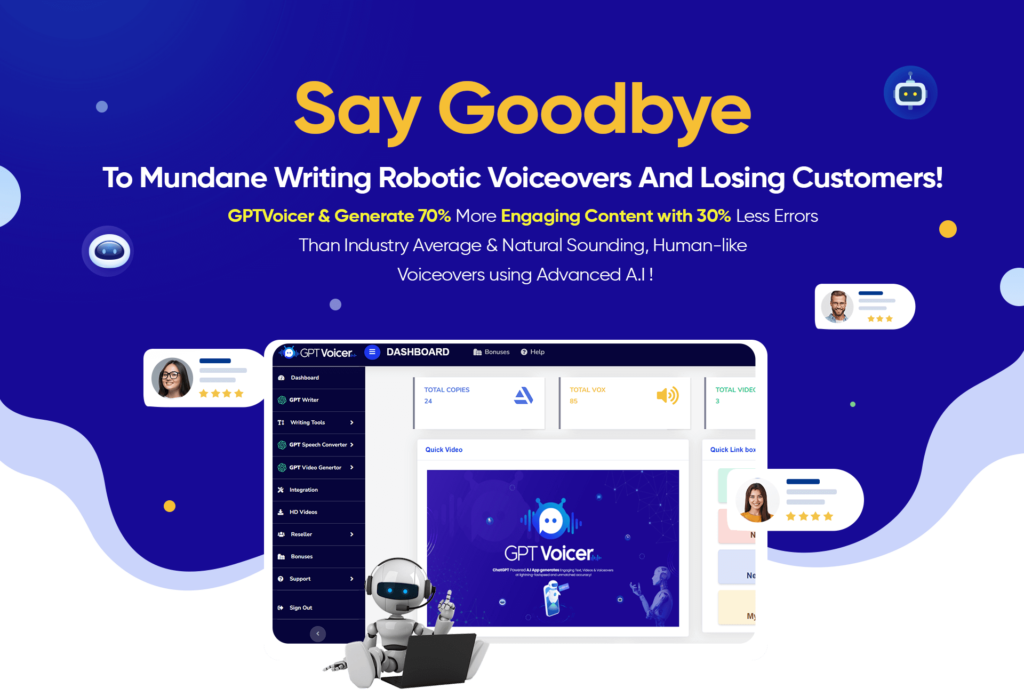
GPTVoicer is an ai voice generator and text to speech AI workspace that pairs 150 natural voices in 50+ languages with a built-in AI writer, so your script and your narration live in the same dashboard. It is a practical ttsmaker alternative for creators who have outgrown a free TTS tool.
Text to speech online · Mac & PC · 30-day money-back guarantee
TTSMaker vs Natural Reader vs GPTVoicer: Side-by-Side
These three tools overlap, but they were built for different jobs. The cards below summarise the differences in plain language.
TTSMaker
- Best for: quick, free text to voice clips
- Pricing: free plan plus paid Pro tiers
- Writing help: none built in
- Licensing: commercial use under published terms
Natural Reader
- Best for: listening to documents and web pages as a text reader
- Pricing: free tier plus paid subscriptions
- Writing help: focused on reading, not drafting
- Licensing: depends on the plan you choose
Most complete
GPTVoicer
- Best for: creators who want text to speech AI plus writing in one place
- Pricing: one-time payment, no monthly fees
- Writing help: ChatGPT-powered AI writer with your own API key
- Licensing: Commercial License for client work
How to Read This Comparison
No single tool wins every category. If you only need an occasional clip, TTSMaker is hard to beat on price. If you mostly want a text reader for long documents, Natural Reader is purpose-built for that. If you produce voiceovers regularly and want one subscription-free ai voice generator with writing support, GPTVoicer fits that brief best.
Natural Reader and Other Text Reader Options Worth Knowing
What Natural Reader Does Best
Natural Reader is built around the idea of a dependable text reader. You can upload documents, scan web pages, and listen through natural-sounding voices, which makes it popular with students and professionals who read a lot. If your goal is to read aloud long files rather than produce publishable audio, a reader-style app may serve you better than a generator.
Built-In Read Aloud Features
Modern browsers and operating systems ship with their own read aloud tools. Microsoft Edge can read web pages out loud, and phones include spoken-content options for accessibility. They cost nothing and need no account, although voice choice and export options are limited compared with a dedicated app.
When a Dedicated AI Voice Generator Makes More Sense
Once you need downloadable files, several languages, and a repeatable brand voice, a purpose-built ai voice generator is the logical next step. That is where GPTVoicer sits, a text to speech AI suite with a library of 150 voices and commercial licensing for people who sell audio work.
Pairing TTSMaker With GPTVoicer, or Switching Completely
Plenty of creators keep a free tool for quick tests and move serious projects to a paid ai voice generator. You can see the product in action on our homepage, which introduces the text to speech online workspace in detail, and our full GPTVoicer review covers pros, cons, and who it suits.
One Dashboard for Writing and Voice
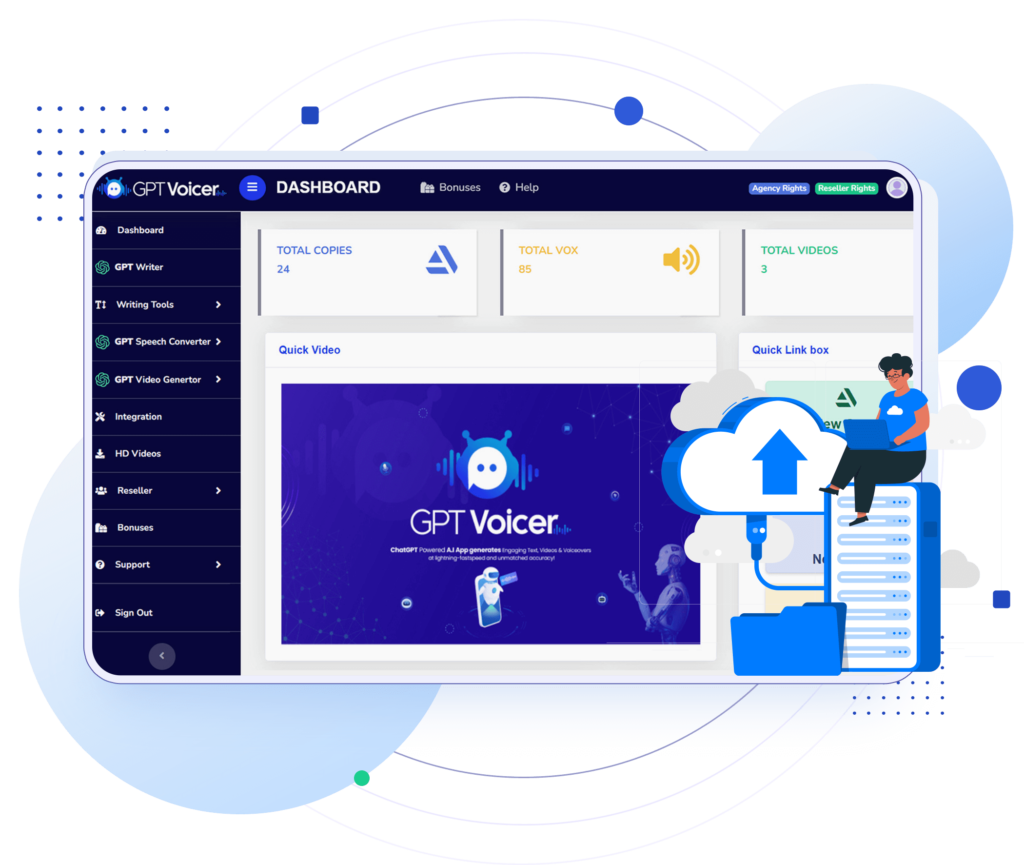
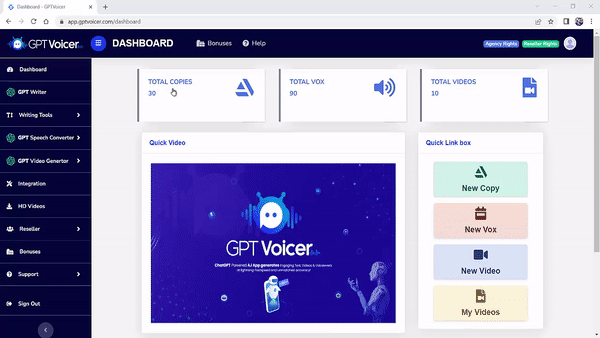
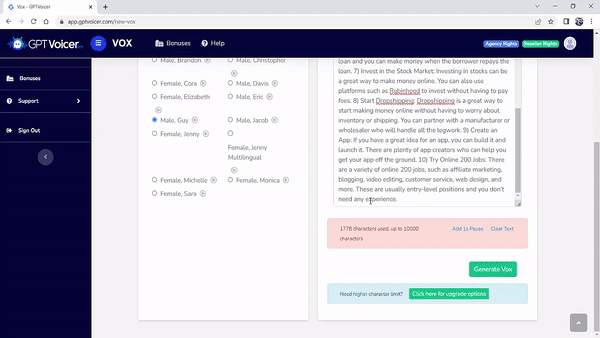
GPTVoicer connects a ChatGPT-powered writer, activated with your own API key, to its text to speech AI engine. You can draft a script, edit it, and voice it without leaving the page. Separate usage fees from the API provider may apply.
150 Voices in 50+ Languages
The voice library covers more than fifty languages, so one script can become several localised versions. Speed, pitch, tone, and volume controls let you tune each voice, and a quick read aloud preview helps you catch awkward lines before you export.
Templates, Training, and Cloud Access
More than 100 ready templates give you a starting point for ads, emails, and scripts, and each draft can become text to audio narration, while training videos walk beginners through setup. Because this text to speech AI workspace runs in the cloud, you can use it on Mac or PC without installing heavy software, which makes it feel close to ttsmaker in convenience but broader in features.
Pay Once, No Monthly Fees
Where many ai text to speech platforms charge every month, GPTVoicer is sold as a one-time purchase backed by a 30-day money-back guarantee. Personal use covers up to 1,000 characters per voiceover, while the Commercial License lifts that to 3,000 and lets you sell work to clients. Check the checkout page for current pricing.
Text to Voice in Three Simple Steps
1. Write or paste your script
Ask the AI writer for a draft or paste your own words.
2. Choose a voice and generate
Pick a language, tone, and pitch, then render the audio.
3. Download and use it
Save the file and drop it into any editor.
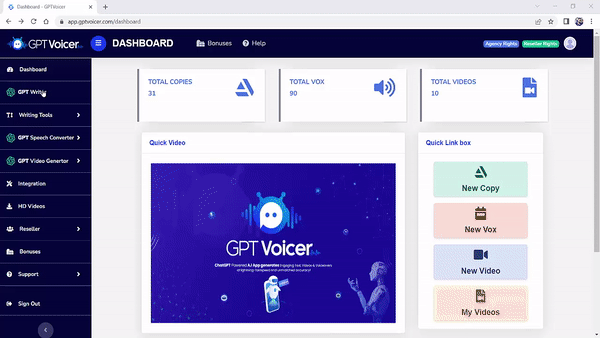
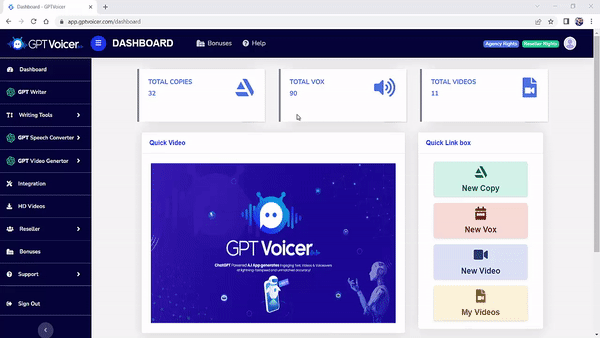
A Look Inside the Dashboard
Text to speech online · Mac & PC · 30-day money-back guarantee
How to Make Any AI Voice Generator Sound More Natural
Voice quality depends on the script as much as the engine. These habits work whether you use a free converter or any text to speech AI platform.
Write for the Ear, Not the Eye
Keep Sentences Short
Long, nested sentences force a TTS voice to guess where to breathe. Aim for one idea per sentence and read aloud each line yourself first.
Use Contractions and Plain Words
People say “don’t” instead of “do not” in conversation. Contractions and everyday vocabulary make synthetic speech feel relaxed instead of formal.
Break Up Long Paragraphs
Short paragraphs create natural pauses and make revisions easier, because you can regenerate only the part that needs fixing.
Control Pace With Punctuation
Commas create small pauses, full stops create longer ones, and dashes add dramatic beats. Adjust punctuation before you touch any slider, because it changes rhythm more reliably than speed settings alone.
Fix Pronunciation Problems Early
Respell Tricky Names
If a brand or a person’s name keeps coming out wrong, try spacing it out or spelling it phonetically, then listen again.
Quick example
Writing “Xiaomi” as “Shao-mee” often nudges a text reader voice toward the right sound.
Test, Listen, and Iterate
Never publish audio you have not heard from start to finish. Listen on headphones and on a phone speaker, because problems hide on one device and show up on the other. A short read aloud pass on your final script catches most mistakes before they reach your audience.
Is It Safe and Legal to Use AI Voices Commercially?
Synthetic voices from any ai voice generator are convenient, but responsible creators treat licensing and disclosure as part of the job. Nothing here is legal advice, so read the current terms of whichever service you use.
Check the Licence Every Time
Each of these services describes permitted use differently, and those descriptions can change. Save the terms that applied when you published a project, so you can show how you were allowed to use the audio.
Disclose Synthetic Voices Where Required
Some platforms ask creators to label realistic synthetic or altered media. A simple note in the description builds trust with viewers and protects your channel.
Respect Voice Likeness and Privacy
Never imitate a real person’s voice without permission, and avoid pasting confidential material into any online TTS converter unless you trust how the provider handles data.
TTSMaker FAQ: Quick Answers to Common Questions
Is TTSMaker really free?
For light use, yes. The free plan has offered a weekly character allowance, and some voices have been marked unlimited. Heavier use moves you toward paid Pro tiers, so check the current plan table before you start.
Can I use TTSMaker audio on YouTube?
The published terms have allowed lawful commercial use of audio from the free plan, which includes monetised videos. Confirm the latest wording, keep a record of it, and follow any disclosure rules your platform sets.
What is the best ttsmaker alternative for creators?
It depends on your workflow. GPTVoicer suits creators who want an ai voice generator with a built-in writer and a one-time price. A reader-style app suits people who mainly want a text reader for documents.
Is Natural Reader better than TTSMaker?
They solve different problems. Natural Reader is strong at reading documents and pages aloud, while TTSMaker is strong at quick, free text to voice downloads.
How do I make text to voice audio sound less robotic?
Write short sentences, use contractions, tune punctuation for pauses, and preview before you export. Choosing a voice that fits your topic matters more than any single slider, and any ai text to speech engine improves with a cleaner script.
Can TTSMaker read aloud a PDF?
If the PDF contains selectable text, you can copy it into the box and generate speech in chunks, then download each text to audio clip. For long documents, a dedicated text reader app is usually more comfortable.
What is the difference between text to speech AI and a basic TTS converter?
A basic converter reads what you give it. Text to speech AI platforms often add scriptwriting, templates, and finer voice control, which shortens the path from idea to finished audio.
Can an AI text to speech app write my script too?
Some text to speech AI tools can. GPTVoicer includes a ChatGPT-powered writer that works with your own API key, so you can draft, edit, and voice a script in one dashboard.
Final Verdict: Is TTSMaker Worth Using?
TTSMaker earns its reputation as a friendly free tool. It gives beginners a way to turn words into text to audio files without a bill, and its commercial-friendly terms are rare among free options. For occasional clips, class projects, and quick tests, it is a solid first stop.
The picture changes when voiceovers become routine. Weekly caps on a free TTS plan, splitting scripts, and juggling a separate writing tool slow professionals down. That is when a complete AI voice generator, or a reader-style app for document listening, starts to make more sense.
Our Recommendation by User Type
- Casual users: start with TTSMaker for free text to voice clips
- Heavy readers: try Natural Reader as your everyday text reader
- Creators and freelancers: choose GPTVoicer for ai text to speech with a writer and a licence
Whichever route you take, test with a real script, listen carefully, and keep the licence terms on file. If you want to see how a pay-once text to speech AI workspace feels in practice, the button below takes you straight to GPTVoicer.
Text to speech online · Mac & PC · 30-day money-back guarantee
Affiliate Disclosure: A few links on this page are affiliate links. If you buy a product or service through them, we may receive a commission, and you pay nothing extra. We only feature products or services that we believe could be useful to our readers.
© Copyright 2026 Text to Speech™. All Rights Reserved.