AI Writing + Text to Speech | Honest Product Review
GPTVoicer Review: Is This ChatGPT-Powered Text to Speech App Worth It?
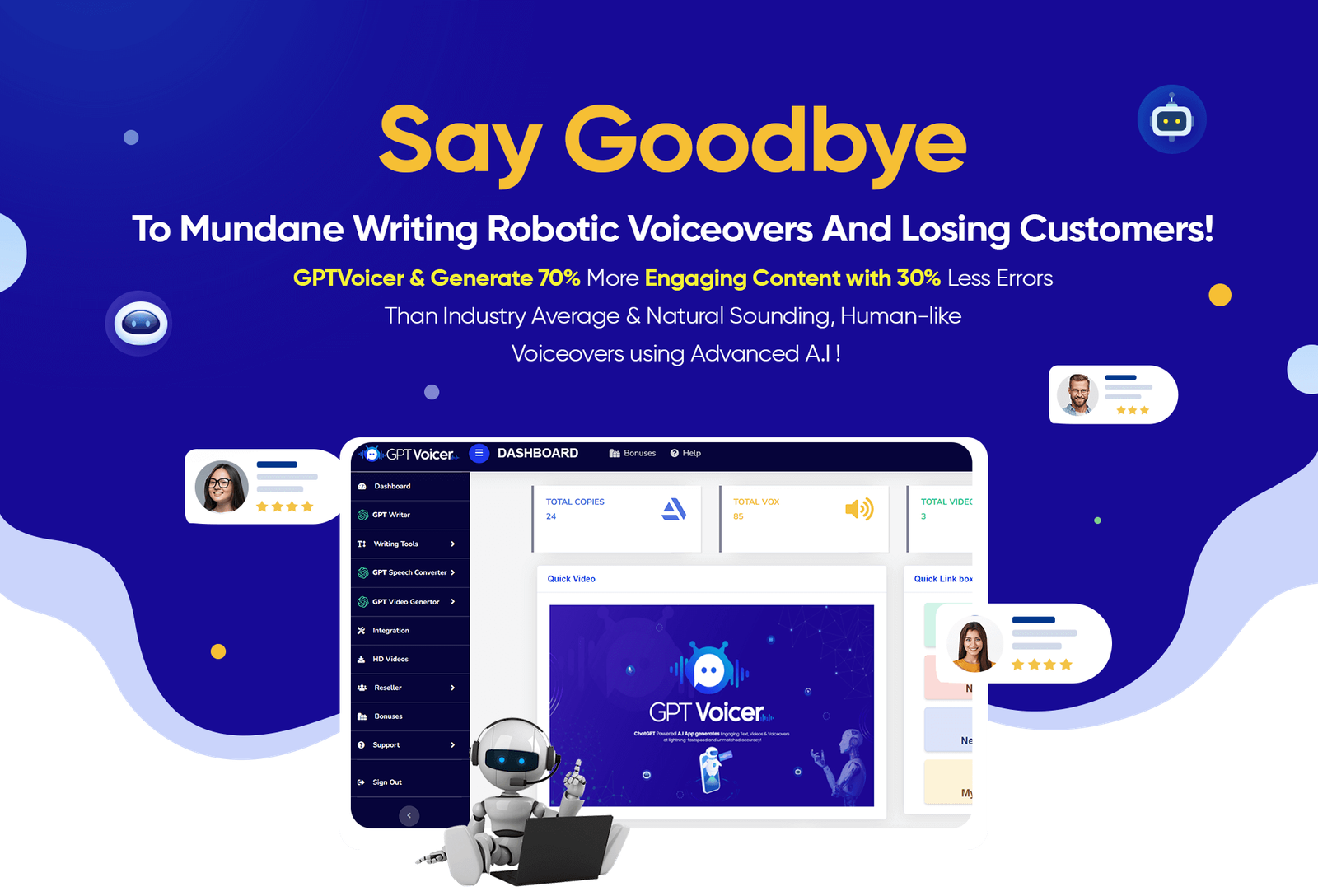
GPTVoicer combines an AI writing tool and a speech converter in one cloud dashboard. This GPTVoicer review covers its features, voices, license options, pros, cons and who it actually suits, so you can decide before you buy.
Affiliate disclosure: this page contains affiliate links. If you buy through them, we may earn a commission at no extra cost to you. Our opinions are our own.
GPTVoicer Review at a Glance
Here is the short version before the deep dive. Every point below comes from the product’s published feature list.
- Product type: ChatGPT-powered writing tool plus text to speech converter
- Voices and languages: 150 voices across 50+ languages
- Voice controls: speed, pitch, tone and volume, plus optional background music
- Done-for-you content: email swipes, articles, sales copies and video scripts
- Platform: cloud-based, works on Mac and PC
- License options: Personal Use and Commercial License
- Training and support: video tutorials, email support and free updates
- Guarantee: 30-day money-back guarantee
What Is GPTVoicer?
GPTVoicer is a cloud-based app that puts two jobs in one dashboard: writing text with ChatGPT and turning that text into a spoken voiceover. Instead of drafting a script in one tool and pasting it into a separate text to speech generator, you create the script and the audio in the same place.
It is aimed at marketers, content creators, freelancers and small business owners who need scripts, sales copy and voiceovers quickly. If you only want to compare the voice side of the product, our text to speech overview explains what the speech converter can do.
GPTVoicer was released by Eric Holmlund and the Firelaunchers team. It runs in the browser, so it works on Mac and PC without any installation.
How GPTVoicer Is Organized
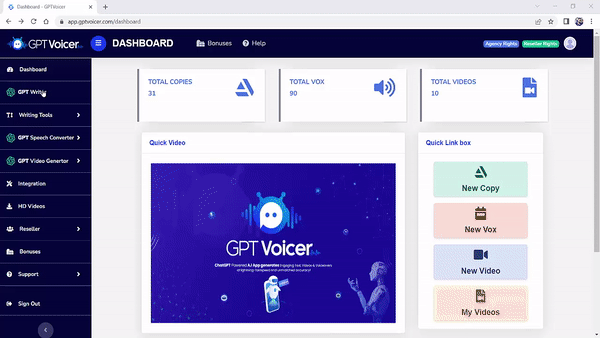
The dashboard has two core tools. The GPT Writing Tool creates text from a keyword or topic, and the GPT Speech Converter turns that text into audio. A library of ready-made templates sits alongside them, so you can start from an existing email, article or script instead of a blank page.
GPTVoicer Key Features
These are the six features that matter most when you decide whether GPTVoicer fits your workflow.
Built-In ChatGPT Writing Tool
Type a topic or keyword and generate blog posts, ads, scripts, product descriptions and sales copy inside the app.
150 Voices in 50+ Languages
Pick a voice and language that matches your audience, from explainer videos to podcasts and training content.
Voice Controls
Adjust speed, pitch, tone and volume to shape exactly how your voiceover sounds.
Background Music
Add music from the built-in library or bring your own track to finish the voiceover.
Ready-Made Content
Start from email swipes, articles, sales copies and video script templates, then customize them.
Cloud Storage
Store up to 1 GB of files per month and download older files whenever you need to free up space.
GPTVoicer Features in Detail
GPT Writing Tool
What You Can Create
The writing tool covers blog posts, articles, ad copy, sales letters, email sequences, product descriptions, social media captions, podcast scripts and video scripts. You supply a topic or keyword, and the tool drafts the text for you.
Where It Still Needs Your Input
The text is generated through your own OpenAI API connection, so you still need to review facts, tone and brand fit before publishing. Treat the output as a strong first draft rather than a finished piece.
GPT Speech Converter
Voices and Languages
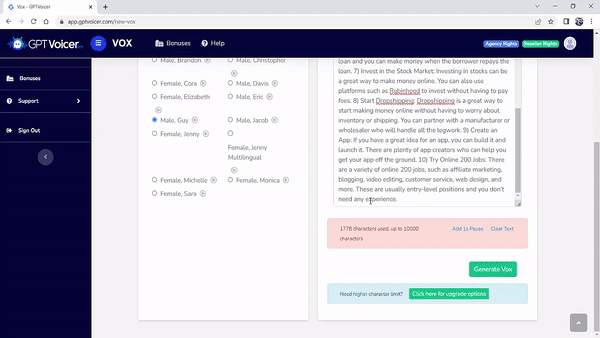
Paste or upload a script, pick one of 150 voices across more than 50 languages, then generate. Multilingual voice support is useful for training videos, product demos and social content aimed at different regions.
Voice Controls and Music
You can change speed, pitch, tone and volume, and layer background music over the voiceover. The finished audio file works with any video editing software, so it slots into your normal editing routine.
Voiceover Length Limits
Personal Use voiceovers are capped at 1000 characters each, while the Commercial License allows up to 3000 characters. Longer scripts can be split into sections and generated one at a time.
Ready-Made Done-for-You Content
Templates Included
The library includes email swipes, articles, sales copies and video scripts in niches such as self-help, health and fitness, and internet marketing. Everything is editable inside the app, and any script can be sent straight to the speech converter.
Training, Support and Updates
Video tutorials walk you through setup, including how to connect the ChatGPT API. Support is handled by email, updates are free, and a 30-day money-back guarantee lets you test the app before committing.
How GPTVoicer Works in 3 Simple Steps
Step 1: Write Your Script
Enter a topic in the GPT Writing Tool, choose a ready-made template or paste in a script you already have.
Step 2: Choose a Voice and Generate
Open the speech converter, select a language and voice, set speed, pitch and volume, then click generate.
Step 3: Download and Use Your Audio
Download the voiceover from the My Vox tab and use it in videos, podcasts, ads or client projects.
Who Is GPTVoicer Best For?
YouTubers and Video Creators
Turn scripts into voiceovers for explainers, tutorials, vlogs and social videos without recording your own voice.
Marketers and Agencies
Produce ad copy, email swipes, sales scripts and video voiceovers from a single dashboard for your own brand or clients.
Course Creators and Educators
Add narration to lessons, e-learning modules and tutorials in many languages with consistent voice quality.
Podcasters and Audiobook Authors
Convert long scripts and chapters into audio, then add background music before you publish.
Freelancers and Small Businesses
Offer content writing and voiceover services to clients, or create your own marketing material in less time.
Who May Want to Look Elsewhere
If you only need a basic reader for web pages or documents, a simpler free text to speech tool may be enough. GPTVoicer makes the most sense when you also want AI writing, ready-made templates and licensing options in the same app.
GPTVoicer Personal Use vs Commercial License
GPTVoicer is offered in two license tiers. The main difference is whether you plan to use the content and voiceovers for yourself or sell them to clients. Check the official page for the latest offer details.
Personal Use
Best for creators and business owners producing content for their own projects.
- Built-in ChatGPT writing tool
- Ready-made email, article, sales copy and video script templates
- Speech converter with 150 voices in 50+ languages
- Speed, pitch, tone, volume and music controls
- Voiceovers up to 1000 characters each
- Up to 1 GB of storage per month
- Beginner friendly with video training
Commercial License
Best for freelancers and agencies who want to sell content and voiceovers to clients.
- Everything in Personal Use
- Rights to create and sell content and voiceovers to clients
- Voiceovers up to 3000 characters each
- Use for podcasts, audiobooks, webinars and videos
- Sell marketing material, scripts, ads and email swipes
- Works with any video editing software
GPTVoicer Pros and Cons
Pros
- Writing and voiceover creation in a single dashboard
- 150 voices across 50+ languages
- Control over speed, pitch, tone, volume and background music
- Ready-made templates speed up first drafts
- Cloud-based, beginner friendly, works on Mac and PC
- Commercial License option for client work
- Video training, free updates and a 30-day money-back guarantee
Cons
- The ChatGPT writing tool needs your own OpenAI API key, and OpenAI usage charges apply separately
- Voiceover length is capped per file, especially on Personal Use
- Ready-made templates focus on a few niches
- AI-written text still needs human editing and fact-checking
- Income claims on the sales page are marketing, so real results will vary
Is GPTVoicer Worth It? Final Verdict
GPTVoicer is a practical choice if you want to write scripts and produce voiceovers without juggling separate tools. The 150 voices, 50+ languages, voice controls and ready-made templates cover most content workflows, and the Commercial License suits freelancers and agencies.
Its limits are the need for your own OpenAI API key, per-file character caps and the usual need to edit AI-written text. Because there is a 30-day money-back guarantee, trying it carries limited risk. The rating above is our editorial opinion, based on the product’s published features.
GPTVoicer Review: Frequently Asked Questions
What is GPTVoicer?
GPTVoicer is an all-in-one cloud app that combines a ChatGPT-powered writing tool with a text to speech voiceover generator, plus a library of ready-made templates.
Is GPTVoicer worth it?
It is worth considering if you want to create scripts and voiceovers in one place, and especially if you plan to offer content services to clients. If you only need a basic text reader, a simpler tool may be enough.
How many voices and languages does GPTVoicer offer?
GPTVoicer offers 150 voices across more than 50 languages, with controls for speed, pitch, tone and volume.
Do I need an OpenAI API key to use GPTVoicer?
Yes. The ChatGPT writing tool connects through your own OpenAI API key, and the video tutorials show how to set it up. OpenAI’s own usage charges apply separately.
Can I use GPTVoicer voiceovers commercially?
The Commercial License is designed for that purpose and lets you create and sell content and voiceovers to clients. The Personal Use license is intended for your own projects.
How long can a GPTVoicer voiceover be?
Personal Use voiceovers can be up to 1000 characters each, and Commercial License voiceovers can be up to 3000 characters each. You can create as many voiceovers as you like.
Does GPTVoicer work on Mac and PC?
Yes. GPTVoicer is cloud-based and runs in the browser, so it works on both Mac and PC without installation.
Is there a money-back guarantee?
Yes. GPTVoicer comes with a 30-day money-back guarantee, so you can test the app and request a refund if it is not right for you.
Ready to Try GPTVoicer?
Write the script, pick a voice and download your voiceover from one dashboard. Test it with the 30-day money-back guarantee and decide for yourself.
© Copyright Text to Speech™. All rights reserved.
Affiliate disclosure: this site is an independent review and may earn a commission from qualifying purchases made through its links, at no extra cost to you. GPTVoicer is a trademark of its respective owners. Results vary from person to person.